Watts Good!
Clean Energy Blog

As the Sun Comes up Every Day,
We'll Keep You Up to Speed.
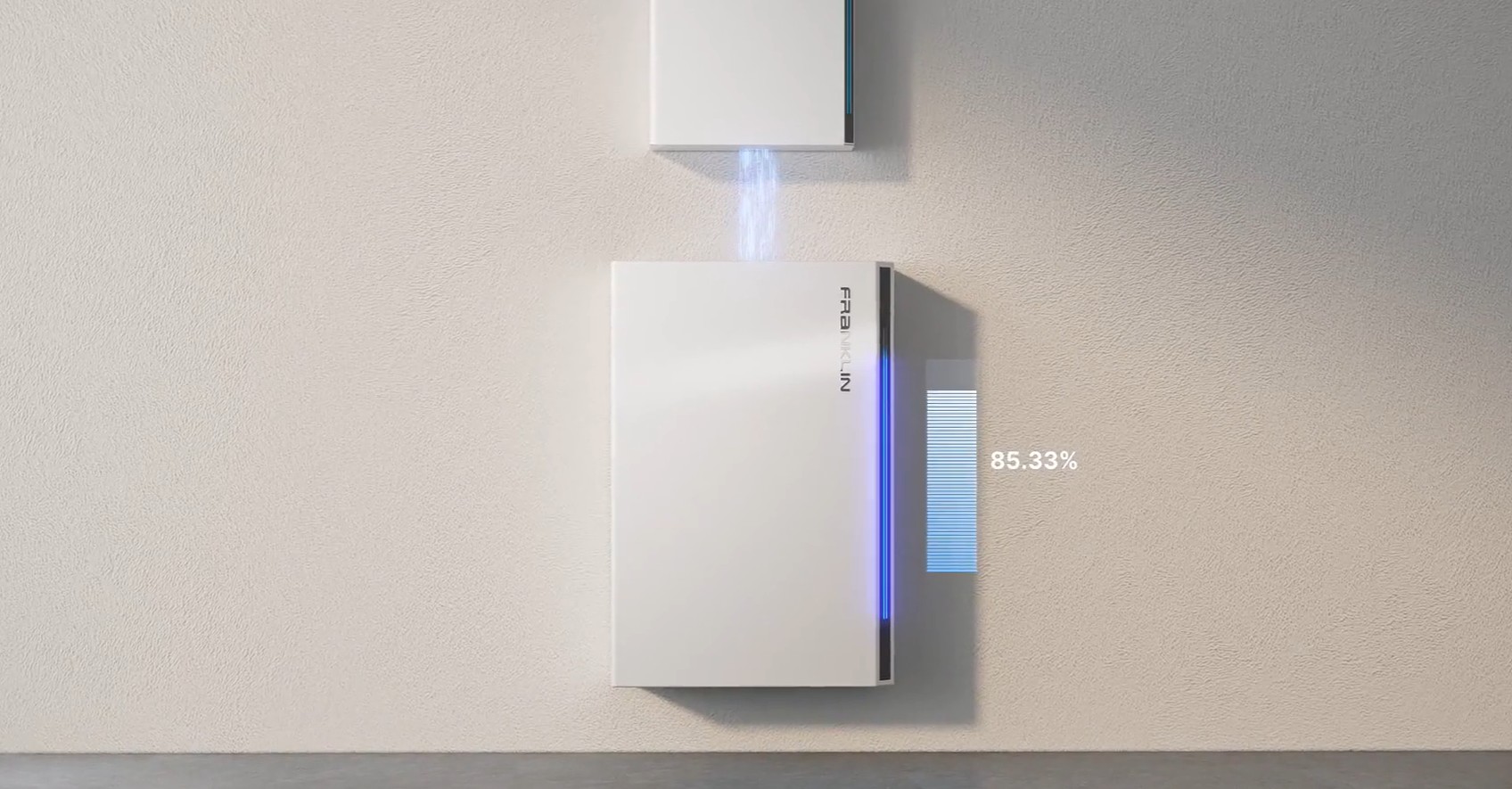
Maximize Your FranklinWH Solar Savings
...
With so much being said about California's energy policy, grid export rates, and why you should or shouldn't export excess solar power, it's no wonder so many of of our clients want to go "Off the Grid". But here in sunny California we need to understand what's literal vs what's figurative - especially when understanding your new FranklinWH Solar+Storage Energy Solution's smart app system settings.
This is a comprehensive guide for your FranklinWH aPower-2 system under SCE’s NEM 3.0 (Solar Billing Plan). This strategy combines financial optimization with your goal of maximum grid independence, for savings and peace of mind - in mind.
The Recommendation: Grid-Tied Self-Consumption
You should remain grid-connected but operate in Self-Consumption Mode.
Under NEM 3.0, the value of energy you "export" to the grid is significantly lower (about 75-80% lower) than the cost of the energy you "import." Therefore, the most profitable way to use your system is to act as your own utility, using the grid only as a safety net and a place to dump surplus power for minor credits.

1. Key Settings for FranklinWH
To achieve your dual goals, configure your FranklinWH app with these parameters:
Operation Mode: Self-Consumption
Why: This mode prioritizes using solar to power your home and charge your batteries. It only pulls from the grid if the battery is empty (which, with your double capacity, should be almost never).
Backup Reserve: 15% – 20%
Why: Since you have double the storage you need, setting a lower reserve allows the battery to "work harder" for your daily savings. You still keep a 20% buffer for unexpected outages, but use the rest to ensure you never pay SCE a dime for overnight power.
Solar Export: Enabled
Why: Once your batteries are 100% full, your 40% surplus solar has nowhere to go. If you were "off-grid," your system would simply stop producing that power. By staying connected, that surplus flows to SCE and creates credits to offset your $15–$20 monthly mandatory connection fees.
2. Why "Off-Grid" Mode is Financially Risky
While your system is capable of running your home entirely, toggling the "Off-Grid" switch in the app is not recommended for daily use because:
Lost Credits: You lose the ability to earn credits from your 40% overproduction.
Safety Net: If you have a massive spike in usage (e.g., guests over, running every appliance at once) that exceeds the battery's instantaneous output, the grid can supplement the power. Without the grid, your system might trip a breaker.
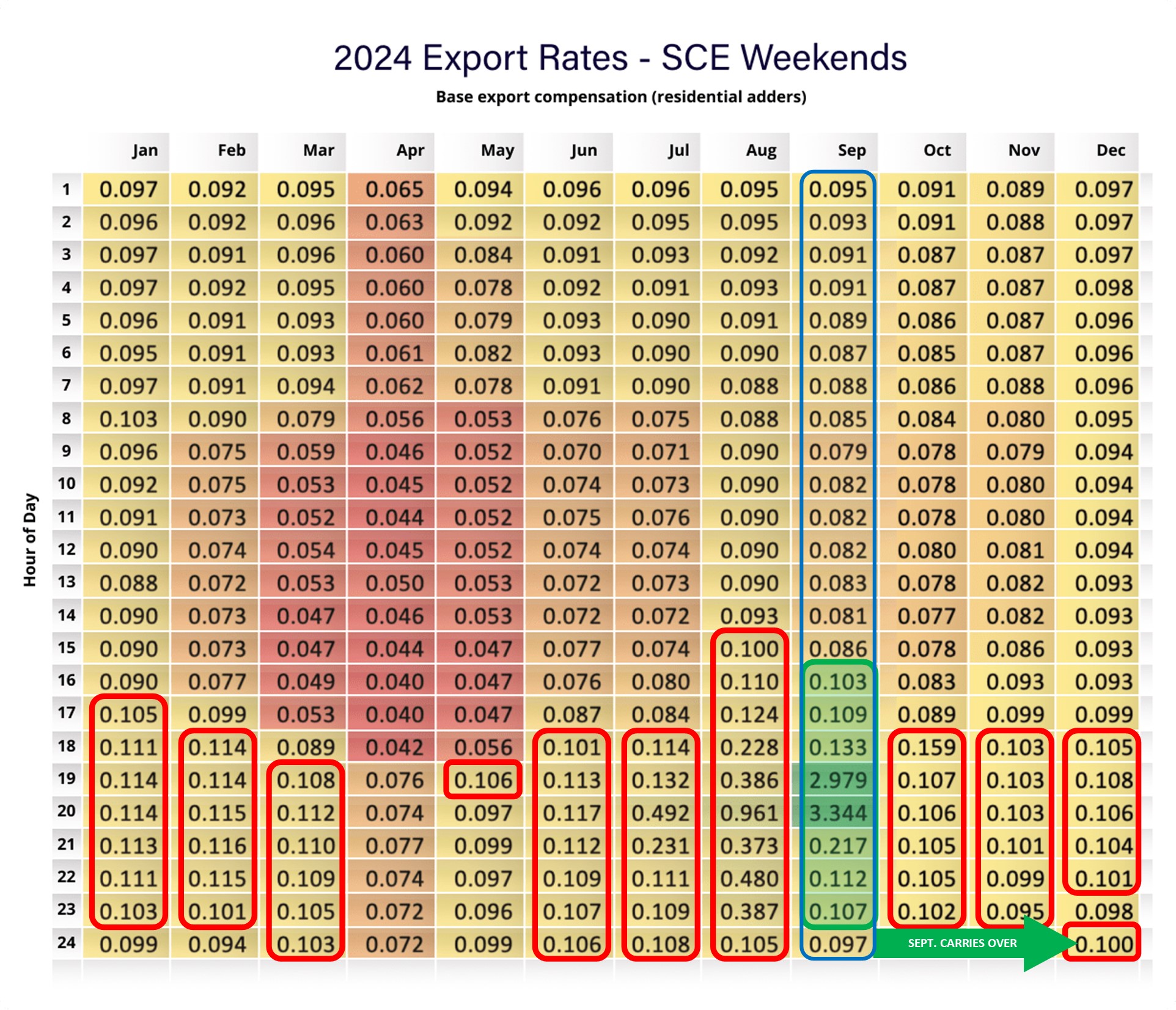
Missed "Peak" Opportunities: In September, SCE export rates can jump to over $3.00/kWh during late afternoon hours. Staying grid-connected allows you to profit from these rare spikes automatically.
3. SCE Rate Plan Optimization
Under NEM 3.0, you are likely on the TOU-D-PRIME rate plan. Here is how your setup interacts with it:
On-Peak (4 PM – 9 PM): Your Franklin batteries will power your home entirely during this most expensive window.
Off-Peak: Your batteries will continue to power the home overnight.
The Result: You only interact with the grid to "sell" your extra 40% during the day or to provide a safety link.

How Seasonal Changes Affect Export Credits Under NEM 3.0. Under NEM 3.0, export credits are highly volatile, shifting from near-zero in the spring to extremely high in late summer. While detailed heatmaps vary annually, the general pattern for SCE remains consistent: you earn the least when the sun is brightest (midday) and the most during extreme grid stress (summer evenings).
Seasonal Trends in Export Credits
Spring (March–May): Export rates are at their lowest—often $0.01 to $0.05/kWh—because of the abundance of solar energy and moderate temperatures.
Late Summer (August–September): This is the "Gold Mine" period. During peak evening hours (roughly 6 PM to 8 PM), export rates can skyrocket to over $3.00/kWh.
Winter (November–February): Rates stay low but stable, generally mirroring the wholesale cost of energy.
SCE NEM 3.0 Weekend Export Heatmap (Typical)
On weekends, export rates are generally lower than weekdays because commercial grid demand is lower. The values below represent typical hourly export credits ($/kWh) for a weekend under the Solar Billing Plan.

Key Takeaways for Your System
Weekend Strategy: Because weekend export rates are lower, prioritize charging your FranklinWH aPower-2
batteries fully and using that power yourself. The "Self-Consumption" value is roughly $0.34/kWh, which is far higher than the weekend export rate.
August/September Weekdays: This is the only time you should consider "gaming" the grid. If your FranklinWH app allows for scheduled discharge, dumping your battery to the grid during those $3.00+ windows can pay for your entire month's connection fees in just a few days.
Surplus Management: Your increased solar offset means you will naturally be exporting in the spring. Don't be alarmed if your credits for these exports are negligible—they are designed to be low to discourage midday exports.
To maximize your financial benefits during the lucrative August and September export windows, you must shift from Self-Consumption to Time-of-Use (TOU) mode in your FranklinWH app.
1. Configure the High-Value Export Window
During August and September, SCE's export rates for NEM 3.0 (NBT) customers peak between 6:00 PM and 8:00 PM on weekdays, sometimes exceeding $3.00/kWh.
How to set this in the FranklinWH App:
Select TOU Mode: Go to Settings > Mode and select Time of Use.
Access Tariff Settings: Tap Tariff Settings. Ensure SCE is your utility and Net Billing (NBT) is selected as your tariff.
Enable Energy Export: In Settings > Grid Charge & Export, ensure Energy Export is set to Solar + aPower. This allows the system to send stored battery energy to the grid, not just solar.
Confirm the Schedule: The FranklinWH app's NBT integration typically automates these exports for August and September peak windows. You can verify this by long-pressing the rate chart in Tariff Settings to see the "Sell" rates for those specific months.

2. Strategic Guidelines for Your Setup
Because you have a 120- 150% solar offset and double the storage you need, use this specific logic:
Daytime (Solar Peak): Your batteries will charge from the sun while the excess 20-50% exports at a low rate (~$0.02–$0.05/kWh).
Evening Peak (6 PM – 8 PM): The system will discharge your aPower-2 batteries at full power (typically 5kW per unit) to the grid. With two units, you could be exporting 10kW per hour.
Overnight: Since you have surplus capacity, even after exporting for two hours, your batteries will likely still have enough energy (above your 20% reserve) to carry your home until the sun comes up.

3. Monitoring Your Credits
The "Net" Effect: The massive credits earned in these two hours can cover your entire month's SCE connection fees and possibly generate an annual credit balance.
SCE Bill Tracking: On your bill, look for the "Energy Export Credit" (EEC) section. This tracks the value of these high-priced exports separately from your standard consumption.
Pro-Tip: If your batteries are not fully charged by 6 PM, your system will prioritize home power. To ensure maximum export, try to minimize heavy appliance use (like laundry or EV charging) between 2 PM and 6 PM to ensure your batteries hit 100% before the high-value window opens.
Actual Customer Testimonial:

Timing is Everything: While the SGIP rebates referenced by our client are no longer available (as of December 30, 2025), the ability to export stored energy during high-value seasons remains in effect - and there’s more! Participation in FranklinWH’s VPP (Virtual Power Plant) allows you to complement your premium SCE exports by capitalizing on another 30-60 annual events with export earnings ~ $2.00/kWh. These combined benefits will supercharge your solar earnings potential.
Participating in a Virtual Power Plant (VPP) program with your FranklinWH system and Southern California Edison (SCE) is a highly effective way to monetize your surplus storage capacity.
1. Recommended VPP Program: California DSGS The primary VPP program for FranklinWH users in California is the Demand Side Grid Support (DSGS) Program. This program incentivizes you for supplying stored energy to the grid during critical times to help prevent blackouts. See more here: FranklinWH Virtual Power Plant
2. How to Enroll (FranklinWH App) Enrollment is handled directly within the FranklinWH App.
Open the App: Log in to your homeowner account.
Navigate to Settings: Tap Settings on the energy home screen.
Select Virtual Power Plant (VPP): Tap this menu option to see available programs.
Complete Enrollment:
Tap Enroll Now or Enroll.
Verify your personal information and SCE account details.
Review and agree to the Terms & Conditions.
Await Approval: You will typically receive an in-app notification or email regarding your status within about two weeks.
3. How Participation Works: Once enrolled, your system will automatically respond to grid "events":
Notifications: You will receive a notification before an event (e.g., "Join the export period from 6 PM to 8 PM").
Automatic Dispatch: By default, your system will automatically discharge your batteries to the grid during these times.
Reserved SOC: You can set a VPP Reserved State of Charge (SOC) in the app settings to ensure your battery never drops below a certain level during an event, maintaining your own backup security.
4. Financial Incentives: While payouts can vary by season and grid need, VPP programs in California typically offer:
Performance Payments: Incentives based on the actual kilowatt-hours (kWh) you provide during events.
Capacity Payments: Some programs offer a monthly or annual "capacity" payment just for being available to the grid.
Important Note: Ensure you are not already enrolled in another "Demand Response" program with SCE, as most VPP programs require you to participate in only one such incentive at a time.

Real-world VPP earnings vary based on the specific program and how aggressively you discharge your batteries. If you have multiple FranklinWH aPower-2 units (approximately 30.0+ kWh of total capacity), your potential is much higher than the average single-battery household.
Under the California DSGS (Demand Side Grid Support) program, which is the standard for FranklinWH, payments are generally based on your performance during "events."
1. Typical Annual Earnings Estimates
For a dual-battery setup like yours in SCE territory, here is what "real-world" annual totals look like:
Conservative Participation: $250 – $400 per year.
Scenario: You keep a high backup reserve (50%) and only participate in a few major summer events.
Optimized Participation: $600 – $1,000+ per year.
Scenario: You lower your VPP reserve to 20%, allowing your 30.0+ kWh of storage to fully discharge during the 30–50 annual events (mostly in July–September).
2. Breakdown of "Event" Payouts
DSGS pays roughly $2.00 per kWh for the average power you provide across the event window.
Example of a Single Event:
Event Duration: 2 Hours (e.g., 7 PM – 9 PM)
Your Discharge: 10 kW (5 kW per Franklin battery)
Total Energy Sent: 20 kWh
Estimated Earnings: $2.00 × 20 kWh = $40.00 for one evening.
[**IMPORTANT**]
Because you have roughly 120-150% solar offset, your batteries will almost always be at 100% before an event starts, allowing you to capture the maximum possible payout for every event SCE calls.
3. Comparison of Program Types
Depending on which partner FranklinWH is currently using for your area (such as Base Power or directly through DSGS), the payment structures differ:

4. Real-World "Stacking" Benefit
The best part for a NEM 3.0 customer is "Value Stacking."
In many cases, VPP events are scheduled at the exact same time as the high-value SCE export windows (August/September 6 PM – 8 PM). This means you aren't just getting the SCE export credit; you are often getting the VPP incentive on top of the grid credit, effectively "double-dipping" for the energy you send back.
Next Step for You
To get an exact estimate for your specific setup, you can check the Virtual Power Plant tab in your FranklinWH app. It often displays the current "Incentive Rate" for your specific zip code and SCE account.
To protect your home, you need to configure the VPP Reserved State of Charge (SOC). This setting acts as a "floor"—once your battery hits this percentage during a VPP event, it will stop exporting to the grid and save the remaining power for your own home.

With multiple FranklinWH aPower-2 units (30.0+ kWh), you have a massive advantage here. Even a small reserve represents a significant amount of backup power.
1. How to Set the VPP Reserve
Open the FranklinWH App.
Go to Settings > Virtual Power Plant.
Look for VPP Reserved SOC (it may also be labeled "VPP Discharge Limit").
Adjust the slider to your desired percentage.
2. Recommended Settings for Your Setup Because you have twice the capacity you typically need, you can afford to be more aggressive to maximize earnings AND stay safe:
The "Balanced" Setting (30%):
Capacity Reserved: ~8 kWh.
Benefit: This is enough to run your lights, Wi-Fi, and refrigerator for 8–12 hours. Even if a blackout hits immediately after a 2-hour VPP event, you are safe until morning.
The "Max Earnings" Setting (15-20%):
Capacity Reserved: ~4–5 kWh.
Benefit: You maximize your VPP payout by letting the grid take more of your energy.
Risk: If a blackout occurs at 9 PM (after the event), you’ll have enough for the basics (refrigerator/lights) but might have to be very careful with AC or heavy appliances.
3. Understanding the "Stack" (Backup vs. VPP) It is important to understand how FranklinWH handles these two different "Reserve" settings:
System Backup Reserve: This is your "Daily" floor. If you set this to 20%, your battery won't power your home below 20% in normal Self-Consumption mode.
VPP Reserved SOC: This is your "Event" floor. If you set this to 30%, the VPP will stop draining your battery at 30%, even if your standard Backup Reserve is set lower.
Pro Tip: For the best protection, set your VPP Reserved SOC slightly higher (e.g., 5-10% higher) than your standard Backup Reserve. This ensures that after a VPP event ends, you still have some "home power" left before the battery hits its absolute daily floor.
4. Real-World Scenario If SCE calls an event for a heatwave from 6 PM to 8 PM:
6:00 PM: Your batteries are at 100%.
6:00 - 8:00 PM: The VPP drains your batteries to your 30% VPP Reserved SOC.
8:00 PM: The event ends. You have earned roughly $35–$40.
8:01 PM: A transformer blows nearby. Your home remains powered by that remaining 30% (~8 kWh), which is plenty to keep your essentials running until the sun hits your panels the next morning.
ONE FINAL STEP To maximize your VPP and SCE export credits, you want your batteries focused on outbound delivery rather than inbound demand. Since your two FranklinWH aPower-2 units can discharge about 10kW total, every kilowatt you "save" inside the house is another kilowatt you can "sell" to the grid.

The "NEM 3.0 & VPP" Peak Window Checklist Target Hours: 4:00 PM – 9:00 PM (especially the 6-8 PM "Gold Mine" in August/September)
1. Kitchen & Laundry (The Heavy Hitters)
Dishwasher: Set a delay timer to start after 10:00 PM or run it in the morning.
Electric Oven/Stove: Avoid heavy baking or self-cleaning cycles. If you must cook, use a microwave or air fryer, which use significantly less energy per minute.
Washer/Dryer: An electric dryer can pull 5kW+ alone—this would effectively "cancel out" one of your Franklin batteries' export capacity. Shift all laundry to morning hours.
2. Climate Control (The "Pre-Cool" Strategy)
A/C Pre-Cooling: Run your A/C lower (e.g., 70°F) from 12:00 PM to 4:00 PM when you have a 120-150% solar surplus.
The "Coast": At 4:00 PM, raise the thermostat to 78°F. Your home will "coast" on the pre-chilled air, preventing the A/C compressor from kicking in during the high-value export window.
3. Electric Vehicles
Charging Interruption: Ensure your EV charger is programmed to stop at 4:00 PM. Even a "Level 2" charger can pull 7kW–11kW, which could completely consume your solar production and battery output combined.
4. High-Energy "Hidden" Loads
Pool Pumps: Schedule your pool filtration to run between 10:00 AM and 3:00 PM when your solar panels are producing their 40% surplus.
Electric Water Heaters: If you have a heat pump water heater, use the FranklinWH Smart Circuit (if installed) to lock it out during VPP events.
Why this matters…
Under NEM 3.0 and DSGS VPP, your energy is worth roughly $2.00 – $3.00/kWh during these specific windows. Using your toaster oven or dryer during this time isn't just costing you the price of electricity; it’s costing you the opportunity to sell that energy at a 1,000% markup.
To automate your savings, you can use FranklinWH Smart Circuits. Your system comes with two built-in 50A smart circuits (and potentially more if your installer added a FranklinWH aPbox).
These allow you to "load shed"—automatically disconnecting heavy appliances during VPP events or when the battery hits a certain level.
1. Identify Your Smart Circuit Loads
First, you need to know which appliances were wired into your Smart Circuits during installation. Common choices are:
HVAC / Air Conditioning
Electric Water Heater
EV Charger
Pool Pump
2. How to Set Up Automation in the App
Follow these steps to ensure these appliances don't "steal" your export profits:
Open the FranklinWH App and go to the Devices or Smart Circuits tab.
Select the Circuit: Tap on the specific appliance (e.g., "Air Conditioner").
·Set "VPP Mode" Logic:
Look for a toggle or setting labeled "Turn off during VPP/External Command."
Enabling this ensures that the moment SCE calls a VPP event, FranklinWH physically cuts power to that appliance so your full 10kW battery output goes straight to the grid for that $2.00–$3.00/kWh credit.
Set "Backup" Logic (SOC-based):
You can set the circuit to turn off if the battery drops below a certain percentage (e.g., "Turn off if Battery < 40%").
This is perfect for August/September. It ensures your A/C doesn't drain the battery before you reach the high-value 6 PM – 8 PM window.
3. The "Smart" Scheduling Strategy
If your appliances are not wired into the Franklin Smart Circuits, you can still automate using the appliance's own apps:
Smart Thermostats (Nest/Ecobee): Use the "Schedule" feature to "Pre-cool" (set to 70°F) from 1 PM – 4 PM and "Deep Setback" (set to 80°F) from 4 PM – 9 PM.
EV Chargers (Wallbox/Tesla/ChargePoint): Use the "Time of Use" setting in the charger app to block charging between 4 PM and 9 PM.

See more about California Net Billing Tariff (NBT)/NEM 3.0 in FranklinWH’s Knowledge Base.
Final Thought... With enough battery capacity to cover 70% or more of your total annual energy consumption paired with 120-150% solar offset, you are in the "Goldilocks" zone for NEM 3.0. Most homeowners struggle to break even under these new solar billing rules by default due to under-sized system deployment, but your setup allows you to turn your home into a mini-power plant that SCE actually pays you to operate.

Have Questions About Your Needs? Getting an ACE Report is your first step toward understanding the math that make sense for you and your unique set of circumstances.
Know BEFORE you go: https://myenergyfax.com/enduser-plans

Have More Questions? We're happy to help!

Free up your time.
Free up your budget.
Free up a troubled mind.
Contact Us

(888) 392-1982
(909) 497-3953
info@freeupsolar.com
34428 Yucaipa Blvd. #E334
Yucaipa CA. 92399, USA




Copyright 2024. All Right Reserved